
Downloader with Internet Download Manager (Windows), with an HTTP agent server, a web interface and download completion tracking. Links can be sent to IDM from any OS.
- Send links to IDM from Python or the command line (referrer, cookies, post data, credentials, user agent, save path, add-only).
- Agent server (
idm --server): receive links over HTTP/JSON and forward them to IDM through COM. - Agent client (
idm -A): send links to an agent from Windows, Linux, macOS or anywhere Python 3.7+ runs. - Web interface served by the agent at
/: add links, watch every IDM download. - Completion tracking: knows if a download is still running, complete, failed or cancelled (reads IDM's own log files).
idm -wwaits for it. - Token authentication, same-origin/CSRF/DNS-rebinding protection, loopback-only by default.
- Standard library only for the server, client and web UI.
Install and update using pip:
pip install idmRequires Python 3.7+. pip install idm detects the OS by itself, you never have to pick packages by hand:
| Command | Windows | Linux / macOS / other |
|---|---|---|
pip install idm |
everything: agent client + agent server + COM (also installs comtypes, pywin32) |
agent client only; Windows-only packages are skipped, install never fails |
pip install "idm[agent]" |
agent client (portable) | agent client (portable) |
pip install "idm[com]" |
adds comtypes |
ignored |
pip install "idm[win]" |
adds comtypes + pywin32 |
ignored |
pip install "idm[all]" |
everything | agent client only |
pip install idm-agent |
agent client only, never installs COM packages | agent client only |
flowchart TD
    A["pip install idm"] --> B{"Windows ?"}
    B -- yes --> C["envdot, make_colors, clipboard, ...<br/>+ comtypes + pywin32"]
    B -- no --> D["envdot, make_colors, clipboard, ...<br/>(comtypes / pywin32 skipped)"]
    C --> E["Full: idm --server, local IDM via COM,<br/>idm -A client"]
    D --> F["Agent client: idm -A http://HOST:8899 URL"]
    F -. "idm --server / local download" .-> G["Clear message:<br/>'Local IDM (COM) is only available on Windows'"]
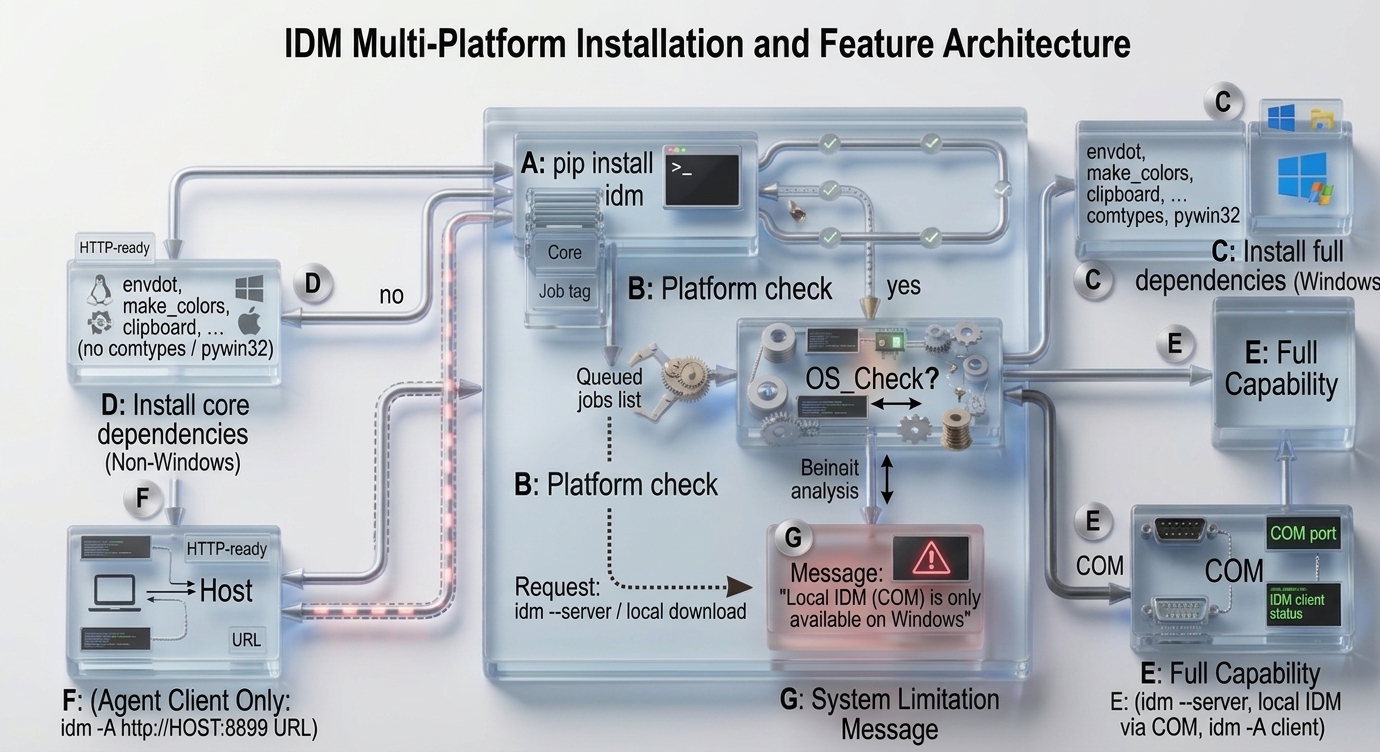
On non-Windows systems import idm and idm -A ... work; idm --server and local downloads print a clear message and exit with code 1 instead of crashing.
The Windows-only packages are declared with environment markers (sys_platform == "win32"), so idm[com], idm[win] and idm[all] are harmless on other systems too.
idm[agent] is portable-only metadata; plain pip install idm on Windows still adds the COM packages (that is the auto-detect). If a Windows machine must never get them (it only forwards links to another PC) use the separate idm-agent distribution (same package, built with PYIDM_AGENT_ONLY=1 python -m build). Install only one of idm / idm-agent.
What does it look like? Here is an example of a simple pyidm program:
from idm import IDMan

downloader = IDMan()
url = "http://test.com/test.exe"

downloader.download(url, r"c:\DOWNLOADS", "test_output.exe")
and "Internet Download Manager (IDM)" will open then immediately download the URL
add link without start downloading
from idm import IDMan

downloader = IDMan()
url = "http://test.com/test.exe"

downloader.download(url, r"c:\DOWNLOADS", "test_output.exe", add_only=True)
download() returns True when IDM accepted the link, False otherwise (the reason is in downloader.last_error).
IDMan() itself never fails; download() raises OSNotSupport (not Windows / comtypes missing) or IDMNotFound (IDM not installed).
or run on terminal/cmd
> idm "http://test.com/test.exe" -p C:\DOWNLOADS -o test_output.exe -c -ua "Mozilla/5.0 (Windows NT 10.0; Win64; x64) AppleWebKit/537.36 (KHTML, like Gecko) Chrome/67.0.3396.99 Safari/537.36" -r "http://test.com/test.exe" -U admin -P admin123 -D "Authorization=Bearer KN9WW7k5gKgCnQLpnmWWM7LytAuSUwb9\nCookie=accountToken=KN9WW7k5gKgCnQLpnmWWM7LytAuSUwb9" -C "accountToken=KN9WW7k5gKgCnQLpnmWWM7LytAuSUwb9;"
# or pyidm
Example use with headers as postData, cookies and other parameters:
from idm import IDMan

downloader = IDMan()
url = "http://test.com/test.exe"

headers = {
    'Authorization': "Bearer KN9WW7k5gKgCnQLpnmWWM7LytAuSUwb9",
    'Cookie': 'accountToken=KN9WW7k5gKgCnQLpnmWWM7LytAuSUwb9',
}
cookies = {
    'accountToken': 'KN9WW7k5gKgCnQLpnmWWM7LytAuSUwb9'
}

username = "admin"
password = "admin123"
confirm = True
user_agent = "Mozilla/5.0 (Windows NT 10.0; Win64; x64) AppleWebKit/537.36 (KHTML, like Gecko) Chrome/67.0.3396.99 Safari/537.36"

downloader.download(url, r"c:\DOWNLOADS", "test_output.exe", "http://test.com/test.exe", cookies, headers, username, password, confirm, user_agent)you can use idm or pyidm
usage: idm [-h] [-p PATH] [-o OUTPUT] [-c] [-a] [-r REFERRER] [-C COOKIE] [-D POST_DATA] [-U USERNAME] [-P PASSWORD] [-ua USER_AGENT] [-s] [--host HOST] [--port PORT] [--token TOKEN] [-A AGENT]
           [--agent-token AGENT_TOKEN] [--local] [-w] [--timeout TIMEOUT] [--no-webui] [--no-watcher] [--jobs-file JOBS_FILE] [--no-persist] [--log-dir LOG_DIR] [-v] [--config CONFIG]
           [URLS ...]

Command line downloader with/Via Internet Download Manager(IDM)

Positional Arguments:
  URLS                  url to download, or "c" to get url from clipboard or a text file containing one link per line

Options:
  -h, --help            show this help message and exit
  -p, --path PATH       Path to save (default: current dir; on agent server: its configured path)
  -o, --output OUTPUT   Save with different name
  -c, --confirm         Confirm before download
  -a, --add             Add link to IDM without start downloading
  -r, --referrer REFERRER
                        Url referrer
  -C, --cookie COOKIE   Cookie string or dict
  -D, --post-data POST_DATA
                        Post Data string or dict
  -U, --username USERNAME
                        Username if require
  -P, --password PASSWORD
                        Password if require
  -ua, --user-agent USER_AGENT
                        Send with custom User-Agent string
  -s, --server          Run agent server: receive links over HTTP and forward them to IDM (COM)
  --host HOST           Agent server bind host (default: 127.0.0.1)
  --port PORT           Agent server port (default: 8899)
  --token TOKEN         Agent server token (or env PYIDM_TOKEN), required if host is not loopback
  -A, --agent AGENT     Send links to an agent server instead of local IDM, e.g. http://192.168.1.10:8899
  --agent-token AGENT_TOKEN
                        Token for the agent server (or env PYIDM_TOKEN)
  --local               Ignore configured agent url, send to local IDM
  -w, --wait            Wait until the download is complete (needs the IDM log watcher), exit code 2 on error/cancel/timeout
  --timeout TIMEOUT     Max seconds to wait with --wait (default: 3600, 0 = forever)
  --no-webui            Agent server: disable the web interface
  --no-watcher          Agent server: disable IDM log watching (download state tracking)
  --jobs-file JOBS_FILE
                        Agent server: where jobs are saved (default: %APPDATA%\pyidm\jobs.json, ~/.pyidm/jobs.json elsewhere)
  --no-persist          Agent server: keep jobs in memory only (lost on restart)
  --log-dir LOG_DIR     IDM log directory (default: %APPDATA%\IDM\DwnlData\<USERNAME>)
  -v, --verbose         Verbose agent server log
  --config CONFIG       set config, format section:option:value, for list valid section/option type "doc"
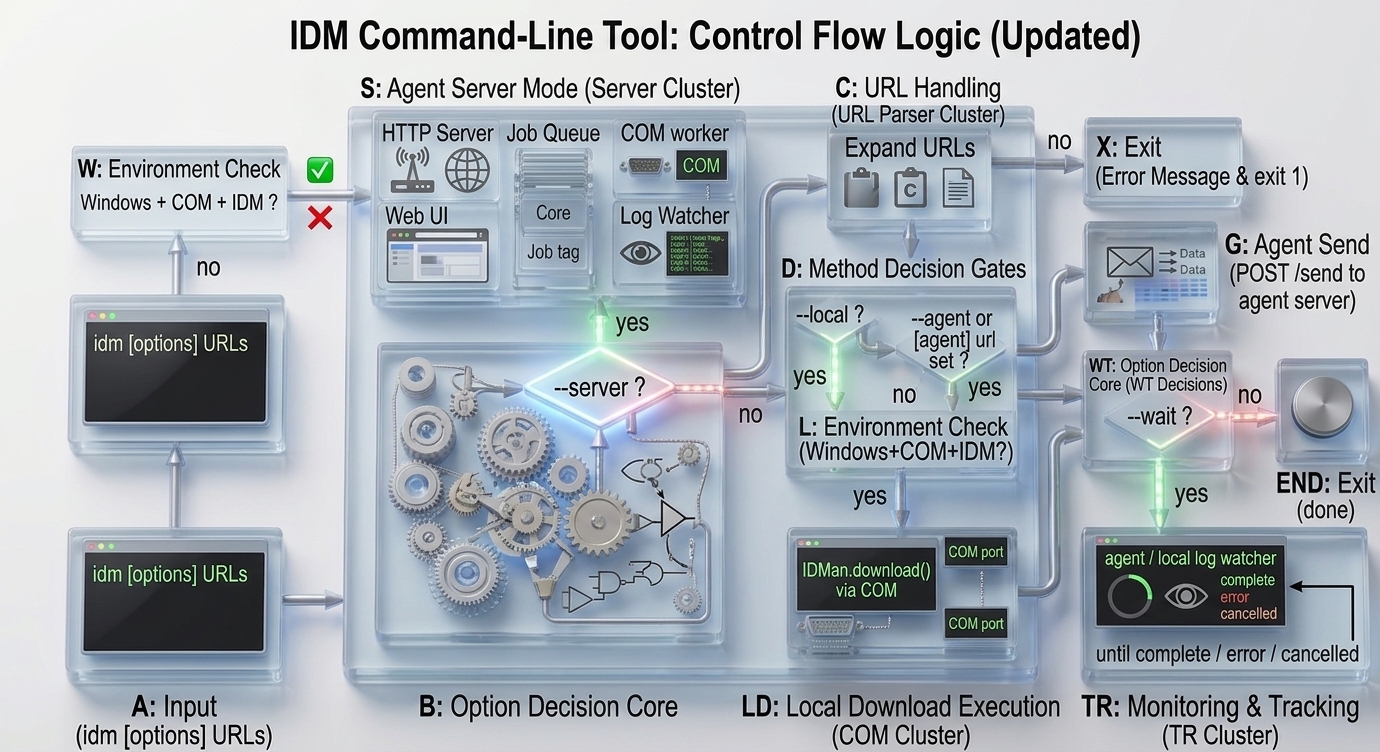
How the CLI decides where a link goes:
flowchart TD
    A["idm [options] URLS"] --> B{"--server ?"}
    B -- yes --> W{"Windows + COM + IDM ?"}
    W -- no --> X["message + exit 1"]
    W -- yes --> S["Start agent server<br/>(HTTP, queue, COM worker, web UI, log watcher)"]
    B -- no --> C["Expand URLS<br/>'c' = clipboard, file = one link per line"]
    C --> D{"--local ?"}
    D -- yes --> L
    D -- no --> E{"--agent or<br/>[agent] url set ?"}
    E -- yes --> G["POST /send to agent server"]
    E -- no --> L{"Windows + COM + IDM ?"}
    L -- no --> X
    L -- yes --> LD["IDMan.download() via COM"]
    G --> WT{"--wait ?"}
    LD --> WT
    WT -- yes --> TR["Poll agent (or local log watcher)<br/>until complete / error / cancelled"]
    WT -- no --> END["done"]
    TR --> END
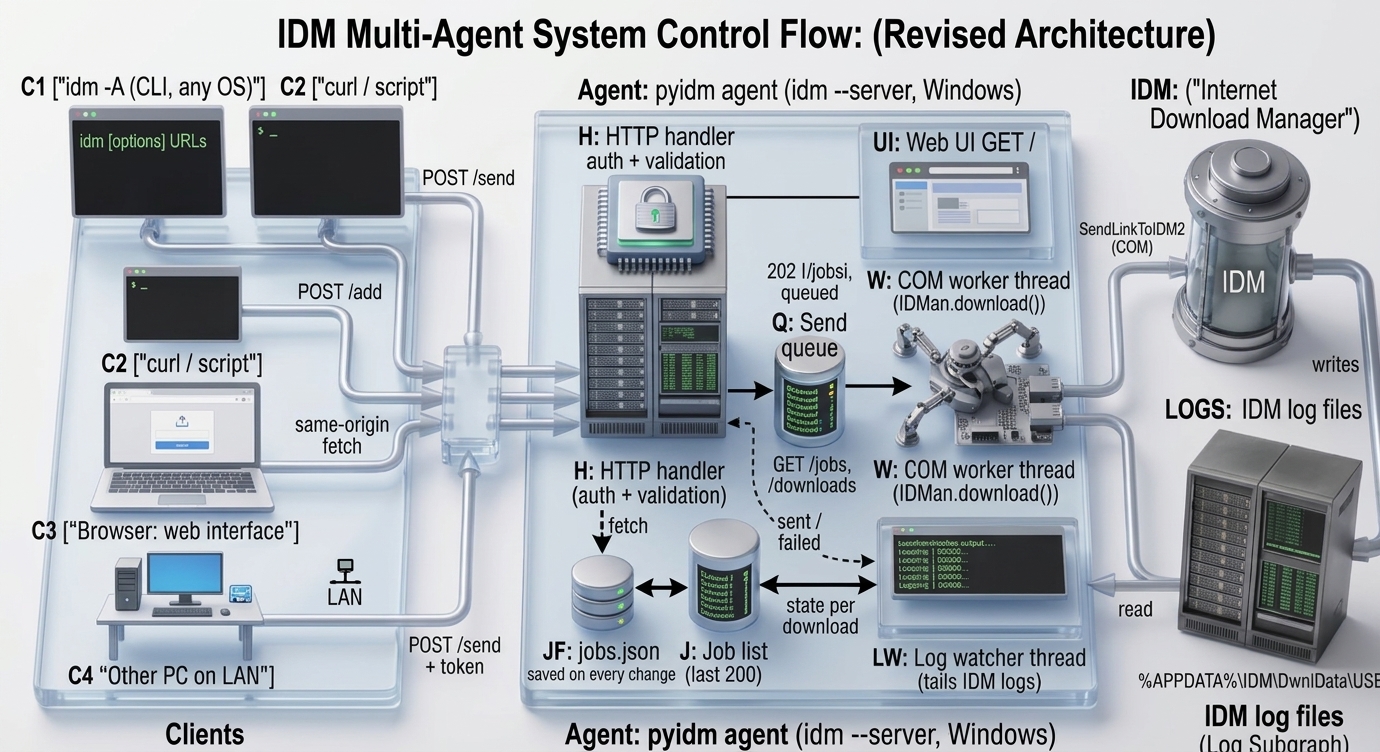
Run idm as a small HTTP agent on the Windows machine where IDM is installed. Any client (another PC, a script, curl, a browser extension, or the built-in web page) sends links to it, the agent forwards them to IDM through COM and then tells you what IDM did with them.
Requests go through a queue and are executed one by one on a single COM worker thread. No extra dependency is needed (Python standard library only).
flowchart LR
    subgraph Clients
        C1["idm -A (CLI, any OS)"]
        C2["curl / script"]
        C3["Browser: web interface"]
        C4["Other PC on LAN"]
    end

    subgraph Agent["pyidm agent  (idm --server, Windows)"]
        H["HTTP handler<br/>auth + validation"]
        UI["Web UI  GET /"]
        Q[("Send queue")]
        W["COM worker thread<br/>IDMan.download()"]
        J[("Job list<br/>last 200")]
        JF[("jobs.json<br/>saved on every change")]
        J <--> JF
        LW["Log watcher thread<br/>tails IDM logs"]
        H -->|"202 queued"| Q
        Q --> W
        W -->|"sent / failed"| J
        H -. "GET /jobs, /downloads" .-> J
        LW -->|"state per download"| J
        H --- UI
    end

    IDM[("Internet Download Manager")]
    LOGS[("IDM log files<br/>%APPDATA%\IDM\DwnlData\USER")]

    C1 -->|"POST /send"| H
    C2 -->|"POST /add"| H
    C3 -->|"same-origin fetch"| H
    C4 -->|"POST /send + token"| H
    W -->|"SendLinkToIDM2 (COM)"| IDM
    IDM -->|"writes"| LOGS
    LOGS -->|"read"| LW
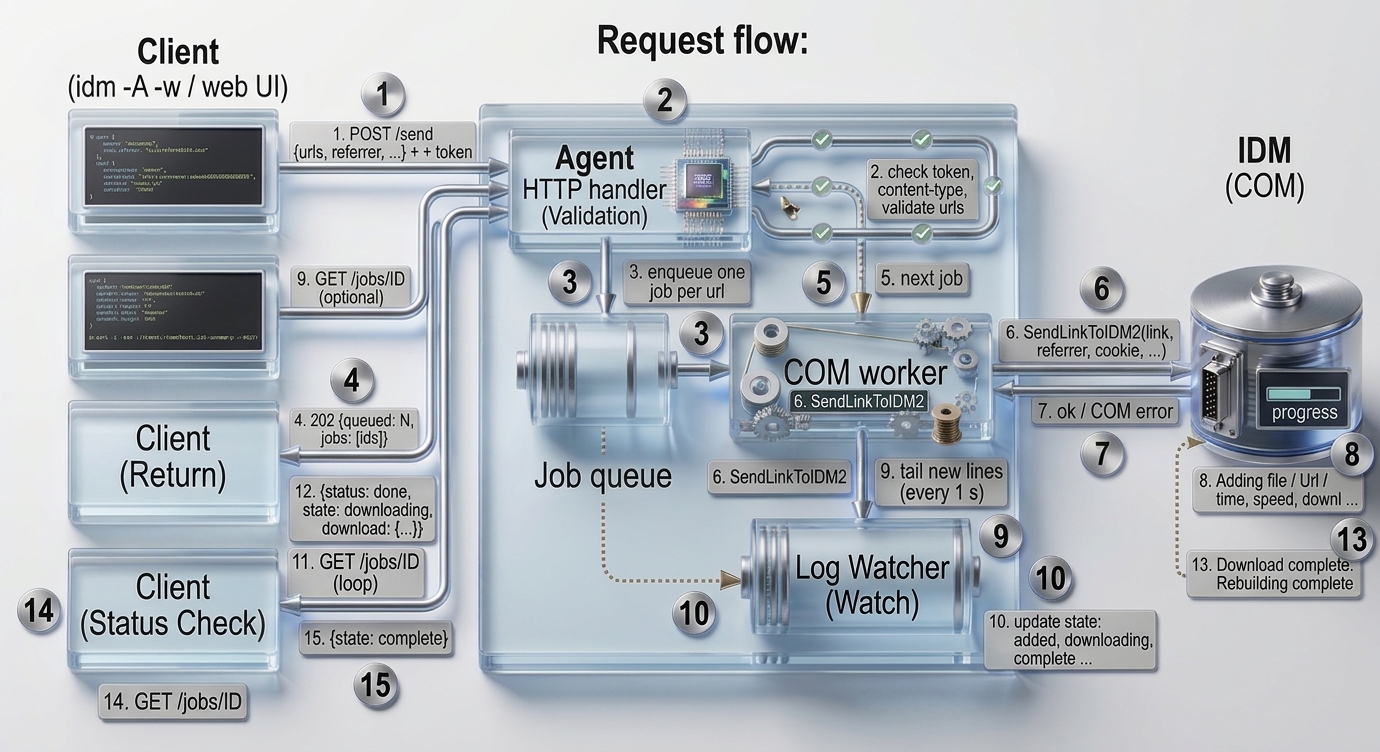
Request flow, including completion tracking:
sequenceDiagram
    autonumber
    participant Client as Client (idm -A -w / web UI)
    participant HTTP as Agent HTTP handler
    participant Queue as Send queue
    participant Worker as COM worker
    participant IDM as IDM (COM)
    participant Log as IDM log files
    participant Watch as Log watcher

    Client->>HTTP: POST /send {urls, referrer, ...} + token
    HTTP->>HTTP: check token/origin, content-type, validate urls
    HTTP->>Queue: enqueue one job per url
    HTTP-->>Client: 202 {queued: N, jobs: [ids]}
    Queue->>Worker: next job
    Worker->>IDM: SendLinkToIDM2(link, referrer, cookie, ...)
    IDM-->>Worker: ok / COM error
    IDM->>Log: Adding file / Url / time, speed, downl ...
    Watch->>Log: tail new lines (every 1 s)
    Watch->>Watch: update state: added, downloading, complete ...
    loop until final state
        Client->>HTTP: GET /jobs/ID
        HTTP-->>Client: {status: done, state: downloading, download: {...}}
    end
    IDM->>Log: Download complete. / Rebuilding complete
    Client->>HTTP: GET /jobs/ID
    HTTP-->>Client: {state: complete}
Start the agent (on the Windows machine where IDM is installed):
> idm --server                                              # 127.0.0.1:8899, no token (loopback only)
> idm --server --host 0.0.0.0 --port 8899 --token SECRET    # token is REQUIRED for non-loopback host
> idm --server -v                                           # log every request and job
> idm --server --no-webui --no-watcher                      # API only, no web page, no completion tracking
Send links to the agent from the command line (works on any OS):
> idm -A http://192.168.1.10:8899 --agent-token SECRET "http://test.com/test.exe" -r "http://test.com" -a
> idm -A 127.0.0.1:8899 links.txt          # text file, one link per line ('#' = comment)
> idm -A 127.0.0.1:8899 c                  # link(s) from clipboard
> idm -A 127.0.0.1:8899 -w "http://test.com/big.iso"   # wait until the download is complete (exit code 0), or failed (2)
Or with HTTP/JSON (Content-Type: application/json is required, token via X-Token or Authorization: Bearer):
curl -X POST http://127.0.0.1:8899/send -H "Content-Type: application/json" -H "X-Token: SECRET" \
-d "{\"urls\": [\"http://test.com/test.exe\"], \"referrer\": \"http://test.com\"}"Open http://HOST:8899/ in a browser. It is a single embedded page (no external files, no CDN):
- paste one or more links, optional referrer / save path / "add only", press Send to IDM;
- table of the jobs sent through this agent with their live state, downloaded bytes, speed and save-as name, a x button per job and Clear finished;
- table of all IDM downloads found in IDM's log files (including ones you started in IDM itself);
- token field (kept in
sessionStorage) when the agent runs with--token; - refreshes every 2 seconds; disable with
--no-webui.
The page itself is public (it contains no data); everything it shows comes from the API, which needs the token if one is set.
COM (SendLinkToIDM2) only hands a link over to IDM, it never reports back. So "was the link accepted" and "did the download finish" are two different questions:
| Field | Answers | Source |
|---|---|---|
status |
was the link handed to IDM? queued, running, done, failed |
COM call result |
state |
what is IDM doing with it? sent, added, downloading, connecting, finishing, complete, error, cancelled, removed, interrupted, lost |
IDM log files + the downloaded file |
The agent runs a small watcher thread that tails IDM's log files (%APPDATA%\IDM\DwnlData\<USERNAME>\*.log, override with [watcher] log_dir or --log-dir), recognises the progress lines (Url, to file, time .., speed .., downl .., Download complete., Rebuilding complete, Connecting..., Cancel by user., ...) and matches each log to a job by URL. Only logs touched in the last 5 minutes are read when the agent starts, so old history does not show up.
stateDiagram-v2
    [*] --> sent: link handed to IDM
    sent --> added: log "Adding file"
    added --> downloading: log "time, speed, downl"
    sent --> downloading
    downloading --> connecting: log "Connecting..."
    connecting --> downloading
    downloading --> finishing: Rename / Deleting temp
    finishing --> complete: "Download complete." / "Rebuilding complete"
    downloading --> complete
    downloading --> cancelled: "Cancel by user."
    downloading --> error: "last chunk. End rebuilding." without complete
    downloading --> complete: log deleted and output file exists
    downloading --> removed: log deleted and no output file
    error --> removed: job deleted in IDM
    cancelled --> removed: job deleted in IDM
    removed --> [*]
    sent --> interrupted: agent died before the link was confirmed sent
    sent --> lost: after a restart, no log and no output file
    interrupted --> [*]
    lost --> [*]
    cancelled --> downloading: resumed in IDM
    error --> downloading: retried
    complete --> [*]
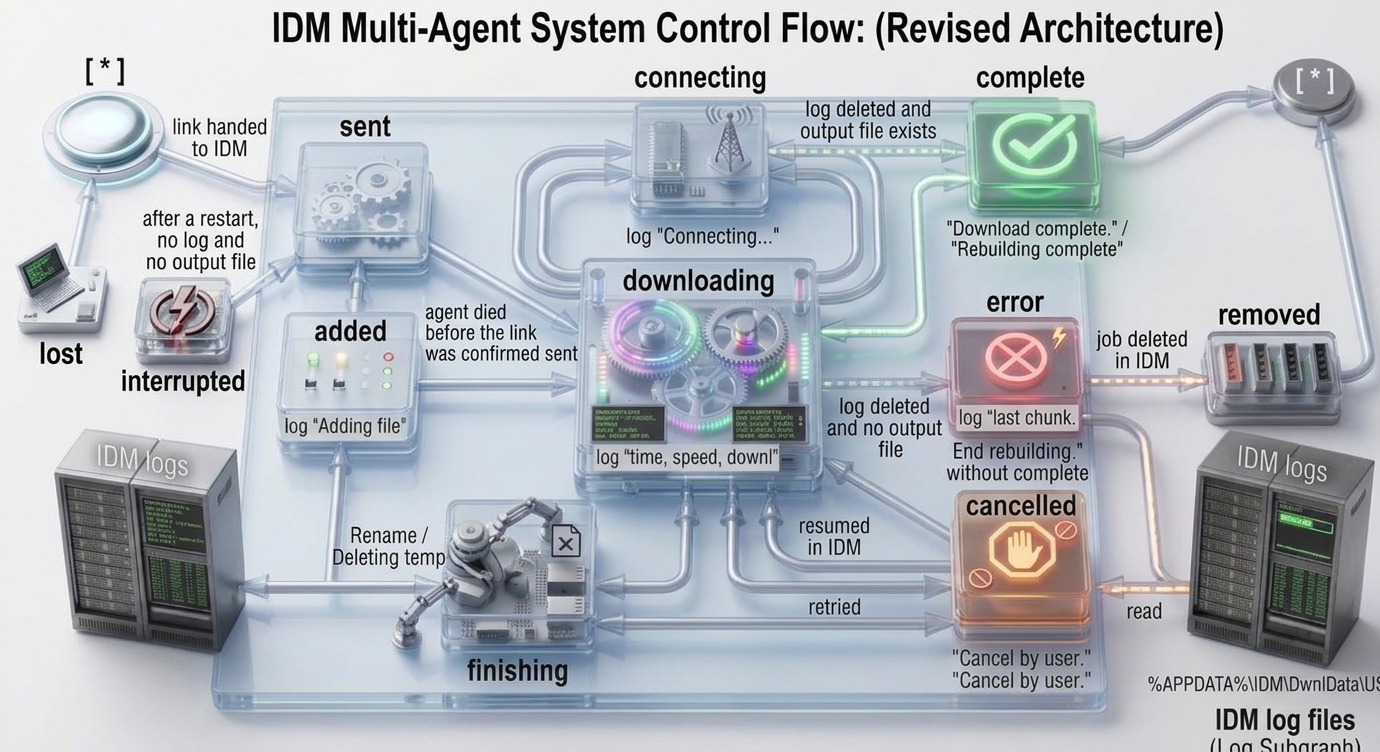
IDM deletes its log file when a download completes (and when you delete the job); only paused / error / cancelled downloads keep theirs. So the log can vanish before the last line is read. The watcher handles this instead of guessing:
- every log it has seen is remembered; if the file disappears, the watcher checks the file IDM was writing (the
to filepath from the log; IDM'sname_1.extrenames in the same folder are accepted too); - output file exists, is not empty and was written after the log was created:
complete; otherwise the job was deleted in IDM:removed; completeandremovedare final and are remembered by the agent job itself, so the web page does not fall back tosentwhen the log is gone;- tiny downloads where IDM creates and deletes the log between two polls (default poll 0.5 s) are never seen in a log at all; for those the agent probes the expected file (
path+output, or the file name from the url) 3 seconds after sending and reportscompleteif it exists.
Finished jobs (complete, removed, failed, interrupted, lost) disappear from the job list after job_ttl (default 1 hour); remove them earlier with the Clear finished / x buttons of the web page, POST /jobs/clear or DELETE /jobs/<id>. This only edits the agent's list, IDM is never touched. Vanished logs stay in GET /downloads for 10 minutes.
Notes:
-a/add_onlyjobs stayaddeduntil you start them in IDM.completeis final immediately.errorandcancelledare treated as final by--waitonly after they stayed unchanged for 10 seconds, because IDM writes some of those lines during normal retries.- If the log directory does not exist (IDM not run yet, other user,
--no-watcher) the agent still works;statestayssentand/healthreports"watcher": false.idm -wthen returns right after sending and says that completion cannot be tracked. - Log line patterns come from IDM's log format as observed on current IDM versions; if a future IDM changes the wording the state stays at its last known value.
| Endpoint | Auth | Description |
|---|---|---|
GET / (/ui) |
no | web interface |
POST /send |
yes | send link(s) to IDM (start download unless add_only: true) |
POST /add |
yes | add link(s) to IDM queue without starting (forces add_only) |
GET /jobs |
yes | jobs sent through this agent, newest first |
GET /jobs/<id> |
yes | one job |
DELETE /jobs/<id> |
yes | remove a job from the agent's list (IDM is not touched) |
POST /jobs/clear |
yes | remove all finished jobs (complete, removed, failed) from the list |
GET /downloads |
yes | every download seen in IDM's log files |
GET /health |
no | {"status":"ok","version":"...","pending":0,"watcher":true} |
Request body (JSON object):
| Field | Type | Description |
|---|---|---|
url / urls |
string / list | link(s), only http, https, ftp (max 500 per request) |
path |
string | save directory on the agent machine (default: [download] path of the agent) |
output |
string | save with different name |
referrer |
string | url referrer |
cookie |
string / object | cookie string or {name: value} |
post_data |
string / object | post data / extra headers |
username, password |
string | credentials if required |
confirm |
bool | confirm dialog in IDM before download |
user_agent |
string | custom User-Agent |
add_only |
bool | add to IDM queue without starting |
Responses:
{"queued": 2, "jobs": ["a1a8d016346c", "3701fe02acc4"]}{"id": "a1a8d016346c", "url": "http://test.com/test.exe", "status": "done", "state": "downloading", "error": null, "time": 1792912521.6,
"download": {"state": "downloading", "speed": 3000, "downloaded": 15000, "saveas": "C:\\DL\\test.exe", "log": "1234.log", "updated": 1792912530.1}}| Status | Meaning |
|---|---|
202 |
accepted and queued |
400 |
invalid JSON, invalid url/field |
401 |
missing/wrong token (or cross-site / foreign Host request without token) |
404 |
unknown endpoint or job id |
411 / 413 |
no Content-Length / body larger than 1 MB |
415 |
Content-Type is not application/json |
stateDiagram-v2
    [*] --> queued: POST /send or /add
    queued --> running: COM worker picks job
    running --> done: IDM accepted link
    running --> failed: COM error / IDM not installed
    done --> tracking: log watcher finds the download
    tracking --> [*]: complete / error / cancelled
    failed --> [*]
Only the last 200 jobs are kept and finished ones expire after job_ttl. The list survives restarts, see Job persistence. GET /downloads is rebuilt from IDM's logs, so it survives agent restarts (within the 5 minute start window).
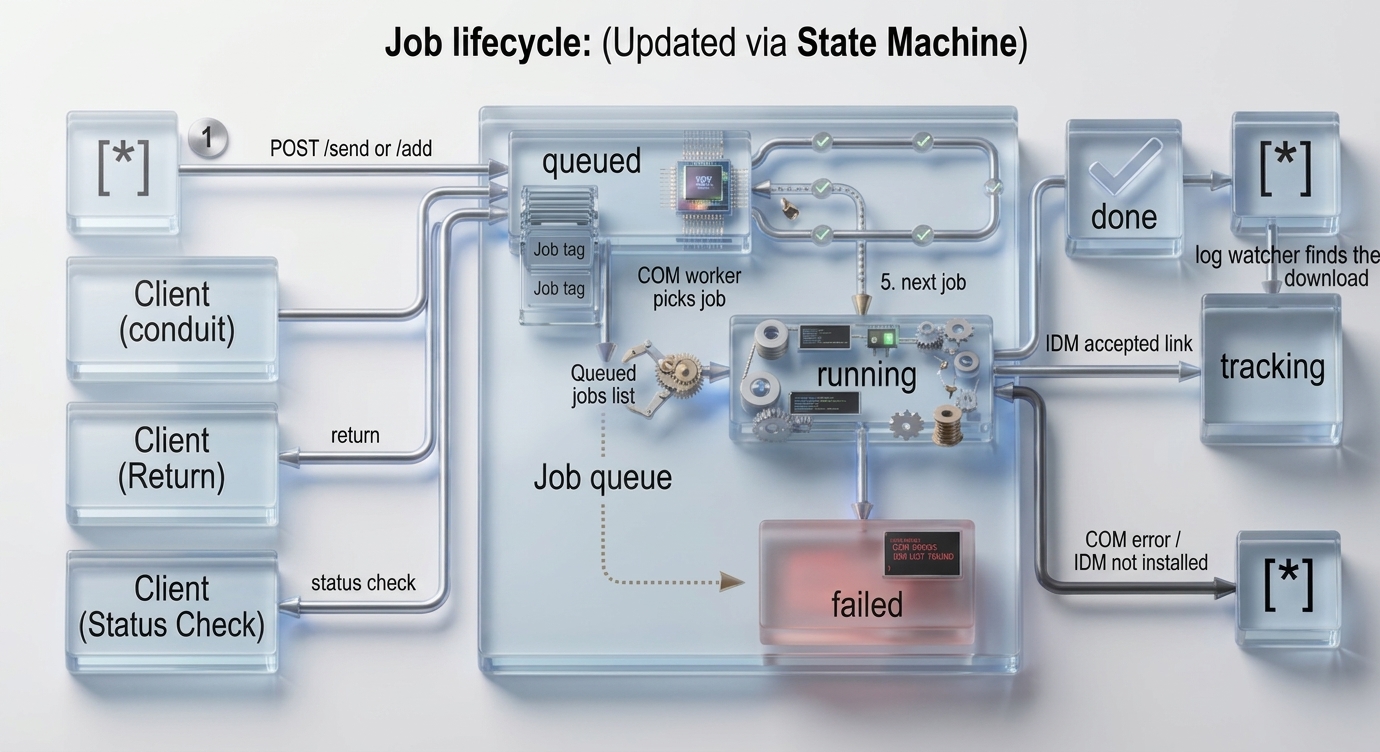
The job list is saved to a JSON file, so a crash, a reboot or Ctrl+C does not lose it:
| file | %APPDATA%\pyidm\jobs.json (Windows), ~/.pyidm/jobs.json (elsewhere). Change with --jobs-file or [server] jobs_file, turn off with --no-persist or [server] no_persist. One agent per file. |
| written | atomically (temp file + replace) after every change, at least once per second, and on shutdown |
| contains | id, url, send status, final state, times and the options path, output, add_only. Never passwords, user names, cookies, post data or referrer. On POSIX the file is 0600. |
| unreadable file | renamed to jobs.json.bad and the agent starts with an empty list |
What happens on start:
flowchart TD
    A["idm --server starts"] --> B["load jobs.json"]
    B --> C{"job status in file"}
    C -- "queued / running" --> D["interrupted<br/>(never resent automatically: IDM may already have it)"]
    C -- "done, state known" --> E["kept: complete / removed ..."]
    C -- "done, still downloading" --> F["log watcher re-reads the IDM logs<br/>written since the oldest unfinished job"]
    F --> G{"log found?"}
    G -- yes --> H["tracking continues: downloading / complete"]
    G -- no --> I{"output file exists?"}
    I -- yes --> J["complete"]
    I -- no --> K["after 60 s: lost"]
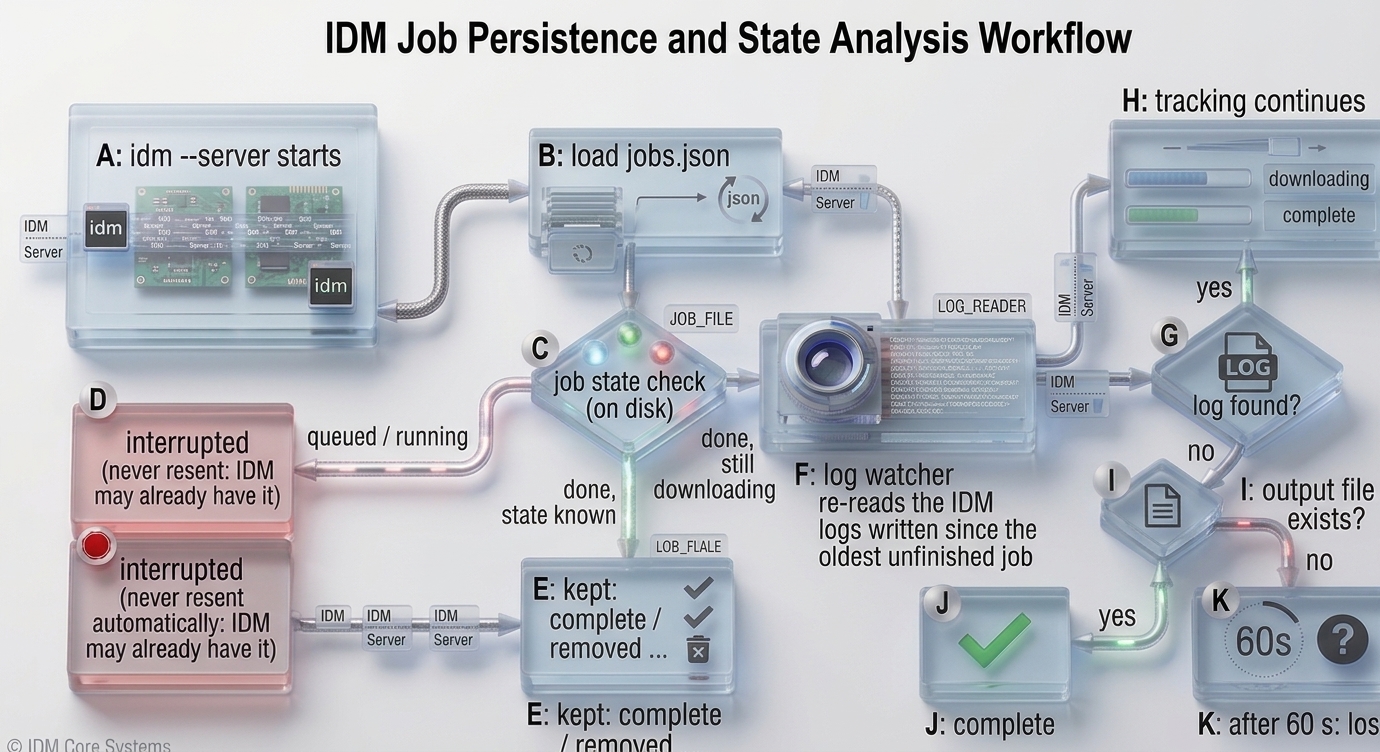
- downloads that finished while the agent was down become
complete(the file is on disk, IDM already deleted the log); - downloads still running keep their live state, and a paused / error download whose log is older than 5 minutes is found again because the watcher's start window is widened back to the oldest unfinished job;
interruptedandlostare final, they expire afterjob_ttland can be cleared like the others; resend the link if you still want it.
Is the queue only for scheduling downloads? No. The agent queue only serialises sending links to IDM: COM objects are bound to one thread, so every request is queued and the COM worker hands the links to IDM one at a time. It does not delay, order or throttle the downloads themselves. Once IDM has the link it downloads immediately (or waits in IDM's own queue with add_only).
| You want | Use |
|---|---|
| download now | POST /send (default) |
| put it in IDM's main queue, start later | add_only: true / POST /add / idm -a |
| time-based scheduling | IDM's own Scheduler (Downloads > Scheduler); add the links with add_only, then schedule the queue in IDM |
from idm import IDMan, AgentServer, agent_send, LogWatcher

# client (any OS)
res = agent_send("192.168.1.10:8899",
                 ["http://test.com/a.exe", "http://test.com/b.exe"],
                 {"referrer": "http://test.com", "add_only": True},
                 token="SECRET")
print(res)   # {'queued': 2, 'jobs': [...]}

# track completion locally (Windows)
w = LogWatcher()
w.start()
state = w.wait_final("http://test.com/a.exe", since=0)
print(state["state"])   # complete / error / cancelled

# embed the agent in your own program (blocks until Ctrl+C)
AgentServer(IDMan(), host="127.0.0.1", port=8899, token=None,
            defaults={"path": r"C:\DOWNLOADS"}, watcher=LogWatcher()).serve()
agent_send raises idm.AgentError when the agent is unreachable or replies with an error.
A job has two fields: status (was the link handed to IDM) and state (what IDM does with it: sent, added, downloading, complete, ...), plus a download object with downloaded bytes, speed and saveas once IDM has started. Everything below works from any OS, only the standard library is used.
Python client (AgentClient)
from idm import AgentClient

c = AgentClient("192.168.1.10:8899", token="SECRET")     # token only if the agent has one
ids = c.send(["http://test.com/a.iso", "http://test.com/b.iso"], referrer="http://test.com")

# 1. one-shot status
print(c.state(ids[0]))                 # 'downloading'
view = c.job(ids[0])                   # {'id', 'url', 'status', 'state', 'error', 'download': {...}}
print(view["download"]["downloaded"], view["download"]["saveas"])

# 2. live progress: a view is yielded on every change, the generator ends when all jobs are final
for view in c.poll(ids, interval=2):
    dl = view["download"] or {}
    print(view["url"], view["state"], dl.get("downloaded"), dl.get("speed"))

# 3. just wait for the result: {job_id: view}
final = c.wait(ids, timeout=3600)
failed = [v["url"] for v in final.values() if v["state"] != "complete"]
print("all done" if not failed else f"not complete: {failed}")| Method | Returns |
|---|---|
send(urls, **opts) / add(urls, **opts) |
list of job ids (add only adds to IDM's queue). opts: path, output, referrer, cookie, post_data, username, password, confirm, user_agent, add_only |
job(id) / state(id) |
one job view / its state string |
jobs() / downloads() |
jobs sent through the agent / every download seen in IDM's logs |
poll(ids, interval=2, timeout=3600, grace=10) |
generator of job views on every state or progress change |
wait(ids, timeout=3600, interval=2, on_change=None) |
{job_id: view} when all jobs are final |
remove(id) / clear() |
remove one job / all finished jobs from the agent's list (IDM is not touched) |
health() |
{"status", "version", "pending", "watcher"} |
Final states are complete, removed, failed, interrupted, lost; error and cancelled count as final after they stayed unchanged for grace seconds (IDM logs some of those lines during normal retries). A job the agent forgot (expired, cleared) is reported once as state: "removed", status: "gone". AgentError (with .code = HTTP status or None) is raised when the agent is unreachable or refuses. If health()["watcher"] is false the agent cannot see IDM's logs: states stop at sent / added and wait() returns right after sending.
Plain functions (same thing without a class): agent_send, agent_poll, agent_wait
from idm import agent_send, agent_poll, agent_wait

ids = agent_send("127.0.0.1:8899", ["http://test.com/a.iso"], {"add_only": False}, token=None)["jobs"]
for view in agent_poll("127.0.0.1:8899", ids, interval=1):
    print(view["state"])
final, tracked = agent_wait("127.0.0.1:8899", ids, timeout=600)
Without an agent (Windows, IDM on the same PC): poll IDM's logs directly
import time
from idm import IDMan, LogWatcher

w = LogWatcher()                       # %APPDATA%\IDM\DwnlData\<USERNAME>
w.start()
url = "http://test.com/a.iso"
since = time.time()
IDMan().download(url, r"C:\DOWNLOADS")

print(w.find(url, since))              # current status dict or None: state, speed, downloaded, saveas ...
status = w.wait_final(url, since, timeout=3600, on_change=lambda s: print(s["state"], s["downloaded"]))
print(status["state"])                 # complete / error / cancelled / removed
w.stop()
HTTP / shell
curl -s -H "X-Token: SECRET" http://127.0.0.1:8899/jobs/JOB_ID          # one job
# poll until finished (Linux/macOS, needs jq)
until [ "$(curl -s -H "X-Token: SECRET" http://127.0.0.1:8899/jobs/JOB_ID | jq -r .state)" = complete ]; do sleep 2; done
Command line: idm -A http://HOST:8899 -w URL does the same and exits with 0 (complete) or 2 (anything else).
Config file is idm.ini inside the package (change with idm --config section:option:value).
| Section | Option | Description |
|---|---|---|
[download] |
path |
default save path (also used by the agent server when the request has no path) |
[download] |
confirm |
confirm before download |
[data] |
user_agent |
default User-Agent |
[debug] |
verbose |
print "Link sent to IDM successfully." |
[server] |
host, port, token |
defaults for idm --server (127.0.0.1, 8899, none) |
[server] |
no_webui |
1 = disable the web interface (same as --no-webui) |
[server] |
jobs_file |
where jobs are saved (default %APPDATA%\pyidm\jobs.json, ~/.pyidm/jobs.json elsewhere) |
[server] |
no_persist |
1 = keep jobs in memory only (same as --no-persist) |
[server] |
job_ttl |
seconds a finished job stays in the list (default 3600, 0 = until removed) |
[agent] |
url, token |
when url is set the CLI always sends to the agent; use --local to force local IDM |
[watcher] |
log_dir |
IDM log directory (default %APPDATA%\IDM\DwnlData\<USERNAME>) |
[watcher] |
interval |
seconds between log scans (default 0.5) |
[watcher] |
disable |
1 = no completion tracking (same as --no-watcher) |
Precedence: command line option, then environment PYIDM_TOKEN (token only), then idm.ini, then built-in default.
Example:
> idm --config server:port:9000
> idm --config agent:url:http://192.168.1.10:9000
> idm --config agent:token:SECRET- The agent listens on
127.0.0.1by default. Binding to any other host is refused unless a token is set. - Without a token (loopback only) requests with a non-loopback
Hostheader are rejected (DNS rebinding), and a request carrying anOriginheader is accepted only when it is the agent's own origin (the built-in web page). A page on any other site cannot trigger downloads.Content-Type: application/jsonis mandatory for POST and no CORS headers are sent. - With a token every endpoint except
/healthand the static page requires it (constant-time comparison). - The web page is served with a strict Content-Security-Policy,
X-Frame-Options: DENYand renders all data withtextContentonly. - Traffic is plain HTTP. For access outside a trusted LAN put it behind a VPN or a TLS reverse proxy.
pathis a path on the agent machine; anyone holding the token can make the agent save files anywhere IDM can write.- Credentials sent in
username/password/cookietravel in the request body, protect the transport accordingly.
schtasks /Create /SC ONLOGON /TN "pyidm-agent" /TR "idm --server --host 0.0.0.0 --token SECRET" /RL LIMITEDRemove with schtasks /Delete /TN "pyidm-agent" /F. The agent must run in the same logged-in user session as IDM (the IDM log directory is per user).
| Problem | Fix |
|---|---|
Local IDM (COM) is only available on Windows |
you are not on Windows: use idm -A http://HOST:8899 URL |
COM support is not installed |
pip install "idm[win]" (or idm[com]); happens after idm-agent was installed on Windows |
Cannot reach agent server |
agent not running, wrong host/port, or firewall (allow the port in Windows Firewall) |
HTTP 401: unauthorized |
token mismatch; pass --agent-token/PYIDM_TOKEN, or the request came from another site / Host |
Refusing to listen on ... without a token |
add --token when using a non-loopback --host |
HTTP 415 |
add Content-Type: application/json |
job failed with COM error |
IDM not installed/running in the same session, check idm --server -v output |
state stays sent |
log watcher off ("watcher": false in /health): check [watcher] log_dir / --log-dir, run the agent as the same Windows user as IDM |
Address already in use |
another process uses the port, choose --port |
- Python 3.7+
- Agent server / local IDM: Windows only (IDM,
comtypes,pywin32) - Agent client (
idm -A,agent_send, web interface): any OS; for plain downloading on Linux you can also usepywget(pip install pywget) or wgetpanel
always provide ‘referrer’, some sites must have referrer in header

