


Product page · AGENTS.md (let an agent install it)
Grade the agent sessions already sitting on your disk.
Jevalyzer reads the chat logs your coding agents write locally — Claude Code, Codex CLI, opencode, Gemini CLI and Google Antigravity — scores every exchange, finds where the agent went wrong, works out which model you actually prefer, and renders it as an interactive HTML report or a terminal dashboard.
The scoring runs on Jev, TypeSafe AI's System One model, through the Vercel AI Gateway. Jev doesn't write text: you give it a state and a set of typed questions, and it returns booleans, choices and scores as calibrated probabilities in one round trip. That is what makes grading a whole history cheap enough to bother with — a typical user pays one to thirty cents for their entire archive.
git clone https://github.com/killerz3/jevalyzer
cd jevalyzer
bun install
bun start
No subcommand to learn. bun start finds your sessions, walks you through setup
the first time, asks how deep to go, shows you the cost before sending anything,
scores with a live progress display, and opens the report.
jevalyzer  grade your local agent sessions with Jev

Found
  Claude Code     61 sessions  220 exchanges, 43.4 MB
  Antigravity     25 sessions  25 exchanges, 472.4 KB

How deep?
  1 minimal    7 questions - scores, leaderboard, preferred model, outcomes  (default)
  2 extensive  21 questions - adds the issue heatmap, communication and risk analysis

Plan
  245 exchanges · 246 requests · 7 questions each
  ~1,253,683 input tokens · ~$0.05 at $0.042/M · via gateway

Scoring
  ⠸ ━━━━━━━━━━━━━━━━━━━━━━━━━━━━━━━━  62%  152/245
     scored 150  ·  24.1/min  ·  486,200 tokens  ·  ETA 4m
     gateway · minimal profile · 7 questions · 120/min allowed
Free tiers are rate-limited, so runs pause. Everything is saved as it lands and
re-running resumes, so Ctrl-C is always safe — run bun start again and it
picks up where it stopped.
Requires Bun 1.2+ — the session readers use bun:sqlite, so
Node alone is not enough.
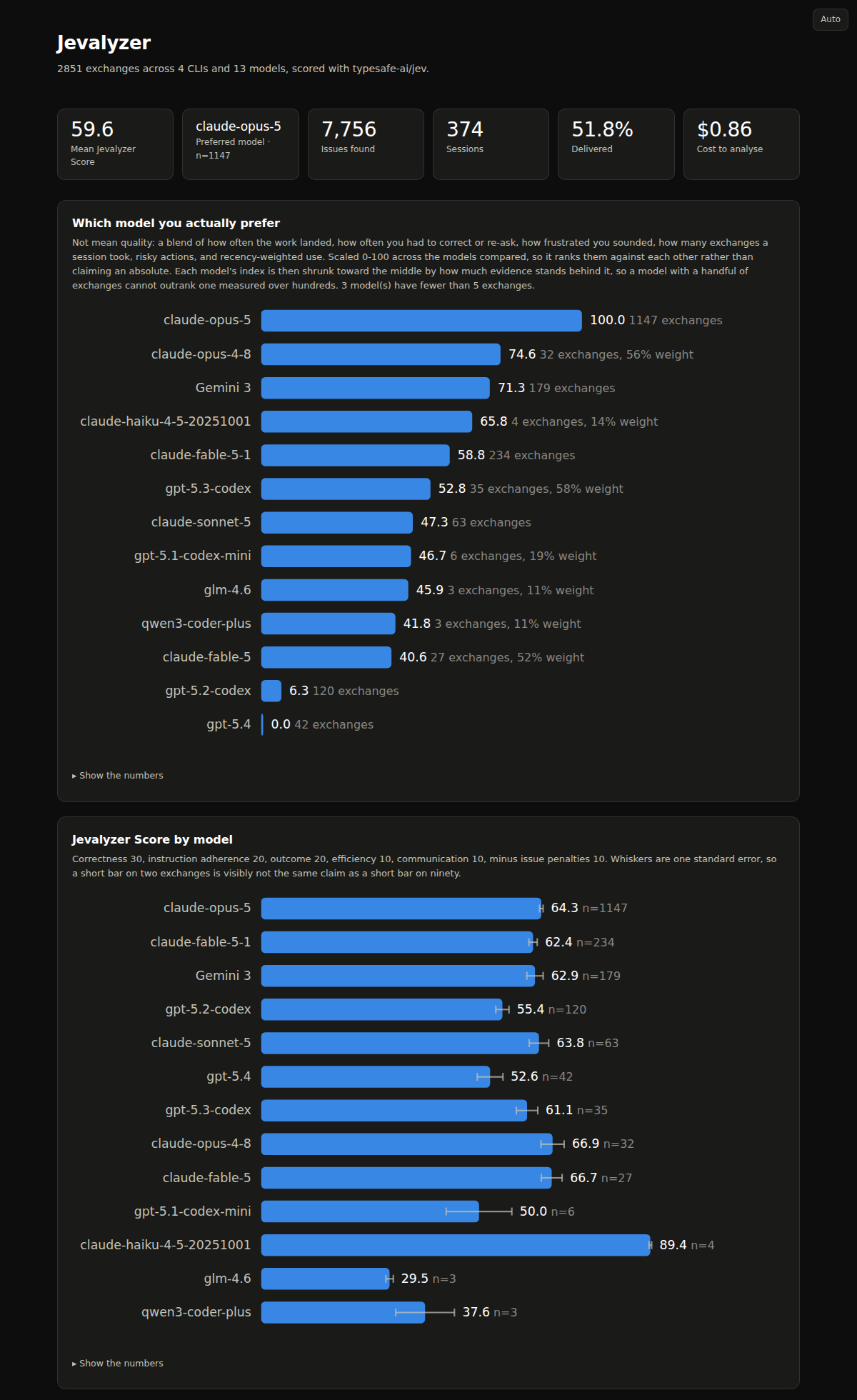
One self-contained HTML file. No server, no upload, no JavaScript dependencies — open it, mail it, or keep it. Every chart has a Show the numbers toggle with the table behind it.
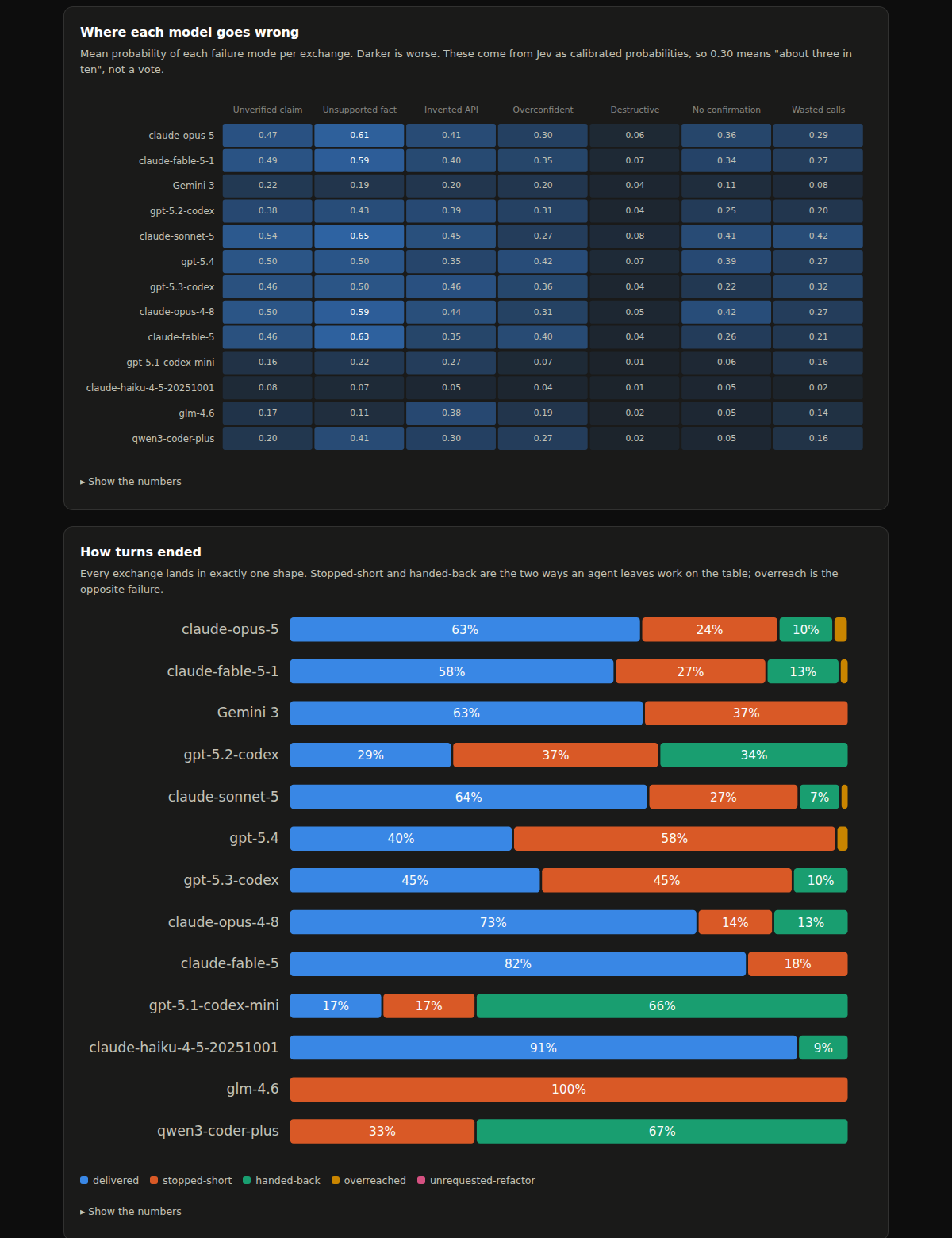
The failure heatmap and the outcome mix come with the extensive profile:
Further down the page, the same treatment is applied per CLI, per project and
per session, so a bad run shows up as a run rather than as scattered low scores.
A terminal version of the same thing is bun start tui.
| Profile | Questions | Good for |
|---|---|---|
minimal (default) |
7 | Scores, model leaderboard, preferred model, outcomes. A third of the tokens and a third of the wall-clock. |
extensive |
21 | Adds the issue heatmap, communication breakdown and risk analysis. |
bun start --profile extensiveThey share one store. An extensive row satisfies a minimal request, so
upgrading later never re-pays for what you already have, and the Jevalyzer
Score renormalises over whichever dimensions a profile asked — the two stay
comparable rather than minimal being dragged toward a neutral middle.
You rarely need these — bun start does all of it — but they exist:
bun start scan               # find sessions, estimate cost. Sends nothing, needs no account.
bun start auth               # store a key
bun start analyze            # just the scoring (--dry-run, --limit, --patient, --profile)
bun start report --open      # rebuild the HTML from the store
bun start tui                # terminal dashboard
bun start doctor --probe # check the setup end to endRun it from the checkout, or link it once and call it from anywhere:
cd jevalyzer
bun link           # now `jevalyzer` works in any directory
jevalyzer scan
bun unlink in the same directory undoes it. Examples further down write
jevalyzer …; from an unlinked checkout that is bun start …, with identical
arguments.
Not on npm yet. For now the clone above is the way to install it. When the package is published this section will say
npm install -g jevalyzer.
The repo carries an AGENTS.md written for coding agents rather
than for people. Paste this into Claude Code, Codex, Gemini CLI or whatever you
run:
Follow the AGENTS.md in https://github.com/killerz3/jevalyzer and install and set it up
It checks Bun, clones and installs, walks you through getting a Vercel AI
Gateway key, runs scan and doctor first so nothing is sent before you have
seen the cost, and hands back a report. It is told explicitly never to invent a key or
send anything you did not approve.
Jevalyzer ships with no credentials — it uses your account, via any of three backends. Whichever you have credentials for is picked automatically, preferring the one that can finish a large run for free.
Vercel AI Gateway (--backend gateway, model typesafe-ai/jev)
- Create a key at the AI Gateway dashboard
jevalyzer auth, orexport AI_GATEWAY_API_KEY=<your vck_ key>
Two things to know about the Gateway on a hobby plan:
- A credit card must be on file before it will serve any request, free or not.
- Free-tier requests on this model are rate-limited well below the documented 1200/min. Jevalyzer handles this: the limiter starts at 120/min, halves whenever the gateway pushes back, and creeps back up, so a run gets slower rather than failing. Adding paid credits removes the throttle.
- Zero data retention needs Pro or Enterprise. On hobby it is refused, so Jevalyzer gives it up automatically after the first rejection and says so.
If you would rather not add a card, use the direct backend below.
Cloudflare Workers AI (--backend cloudflare, model typesafe/jev)
Workers AI serves Jev as a partner model, which means it is outside the
free Neurons allocation: a call returns 2021 Insufficient balance; add money to your gateway or use BYOK. It needs either Cloudflare credit, or your own
TypeSafe key configured as BYOK on the account's AI Gateway. For that reason it
is never auto-selected.
jevalyzer auth --cloudflare— asks for your account id and an API token- Or
export CLOUDFLARE_ACCOUNT_ID=... CLOUDFLARE_API_TOKEN=... jevalyzer analyze --backend cloudflare
Context there is 32k, not 64k; the packing budget adapts automatically.
TypeSafe directly (--backend typesafe, model jev-latest)
- Create a key at console.typesafe.ai/keys
jevalyzer auth --typesafe, orexport TYPESAFE_AI_API_KEY=<your sk- key>
Early access is waitlisted and there is no free credit, so this is mainly for people who already have a TypeSafe account.
Precedence is --api-key > environment > ~/.jevalyzer/config.json (mode 600).
--model accepts any AI SDK evaluation model, so you can also point at an
Anthropic, OpenAI or Google model instead.
Free-tier Gateway keys get a small rolling allowance on this model, so a large history will not score in one go. Jevalyzer is built for that:
- Every exchange is saved the moment it is scored, never batched to the end.
- Sustained rate limiting ends the run cleanly instead of grinding, telling you how many landed and how many remain.
- Re-running resumes: anything already scored is skipped by content hash.
--patientsends one request at a time, which survives the throttle best.
So the way to score a big archive for free is to leave it dripping:
# one pass whenever the allowance has refilled
while ! jevalyzer analyze --patient --yes | grep -q "Nothing new"; do sleep 600; done
Paid credits remove the throttle entirely and the whole archive finishes in minutes for a few cents.
Jev is free on Vercel AI Gateway until 25 Sep 2026. After that it is $0.042 per million input tokens, output free. Measured against a real 40 MB Claude Code archive:
| Your history | Sent to Jev | Cost |
|---|---|---|
| 40 MB (61 sessions) | 0.31M tokens | $0.013 |
| 200 MB | 1.5M tokens | $0.07 |
| 1 GB (heavy Codex use) | 7.7M tokens | $0.33 |
Results are cached by content hash, so re-running only pays for exchanges it has
not seen. analyze prints an estimate up front and refuses to exceed
--budget (default $5) without confirmation.
Transcript text — prompts, replies, tool calls and tool output — is sent to the
Vercel AI Gateway for scoring. Nothing else is uploaded, nothing is stored
outside ~/.jevalyzer/, and no telemetry is sent anywhere.
jevalyzer analyze --dry-runprints byte-for-byte what a request would contain and sends nothing.--redactstrips API keys, tokens, JWTs, private keys, emails and your home path before sending.- Zero data retention is requested by default, and dropped automatically if your
plan does not allow it (the run says so);
--no-zdrskips asking. jevalyzer scan,reportandtuiare entirely local.
Twenty typed questions per exchange, answered in parallel against one state:
Quality — correctness, self-verification, instruction adherence, scope deviation, clarity, verbosity calibration, over-hedging, needless self-correction, efficiency, wasted tool calls.
Issues — unsupported claims, invented APIs and flags, confidence/evidence mismatch, how the turn ended (delivered / stopped-short / handed-back / overreached / unrequested-refactor), destructive actions, acting without confirmation, blast radius.
Your reaction — what your next message says about how the turn landed, and how frustrated it sounds. This is the closest thing to ground truth available, and it is what drives the preference index.
0–100 per exchange: correctness 30, instruction adherence 20, outcome 20, efficiency 10, communication 10, minus issue penalties 10.
Deliberately not mean quality. What you prefer shows up in behaviour, so the index blends delivered rate, how often you corrected or re-asked, frustration, exchanges per session, risky actions, and recency-weighted usage — each z-scored across the models being compared. Every component is shown alongside the index so the number can be argued with, and small samples are labelled rather than hidden.
| Tool | Path |
|---|---|
| Claude Code | ~/.claude/projects/<project>/<session>.jsonl |
| Codex CLI | $CODEX_HOME/sessions/YYYY/MM/DD/rollout-*.jsonl |
| opencode | ~/.local/share/opencode/opencode.db (SQLite; legacy JSON layout also read) |
| Gemini CLI | ~/.gemini/tmp/<hash>/chats/*.json |
| Antigravity | ~/.gemini/antigravity-cli/brain/<id>/.system_generated/logs/transcript.jsonl |
jevalyzer doctor reports which of these were actually found.
Jev's context limit is 64k tokens for state and questions combined. Exchanges are packed to a 56k target through a truncation ladder (drop reasoning, trim tool output, trim replies, trim prompts), and anything still too large — a single autonomous run can hold megabytes of tool output — is split into segments, scored piecewise and merged, with the row marked as chunked.
The token estimator calibrates itself against the usage the gateway reports, so the estimate tightens as it runs.
MIT licensed.